SaaS metrics from your contracts, closed each month
ARR, the bridge, retention and cohorts come from the same contract data, at constant currency. Close the month and the board pack reads from the closed figures, with later changes shown as restatements.
An MRR bridge with no balancing item
Each customer’s movement comes from dated contract changes, and currency translation sits on its own line. Opening MRR plus the movements always equals closing MRR.
Northwind Analytics, sample company
September 2026 MRR bridge, US dollars
| Line | USD |
|---|---|
| Opening MRR, 31 Aug | 147,708 |
| New business | 460 |
| Expansion | 13,201 |
| Reactivation | – |
| Contraction | – |
| Churn | (870) |
| FX impact | 614 |
| Closing MRR, 30 Sep | 161,113 |
Net revenue retention 100.8% and gross revenue retention 89.1%, trailing twelve months at constant currency. Opening and closing bars are cut at $140,000 so the movements are legible.
- Constant currency
- Exchange-rate changes never appear as expansion or churn.
- Reactivation
- Returning customers are kept out of new business.
- Tested
- A property test checks the reconciliation on random contract histories.
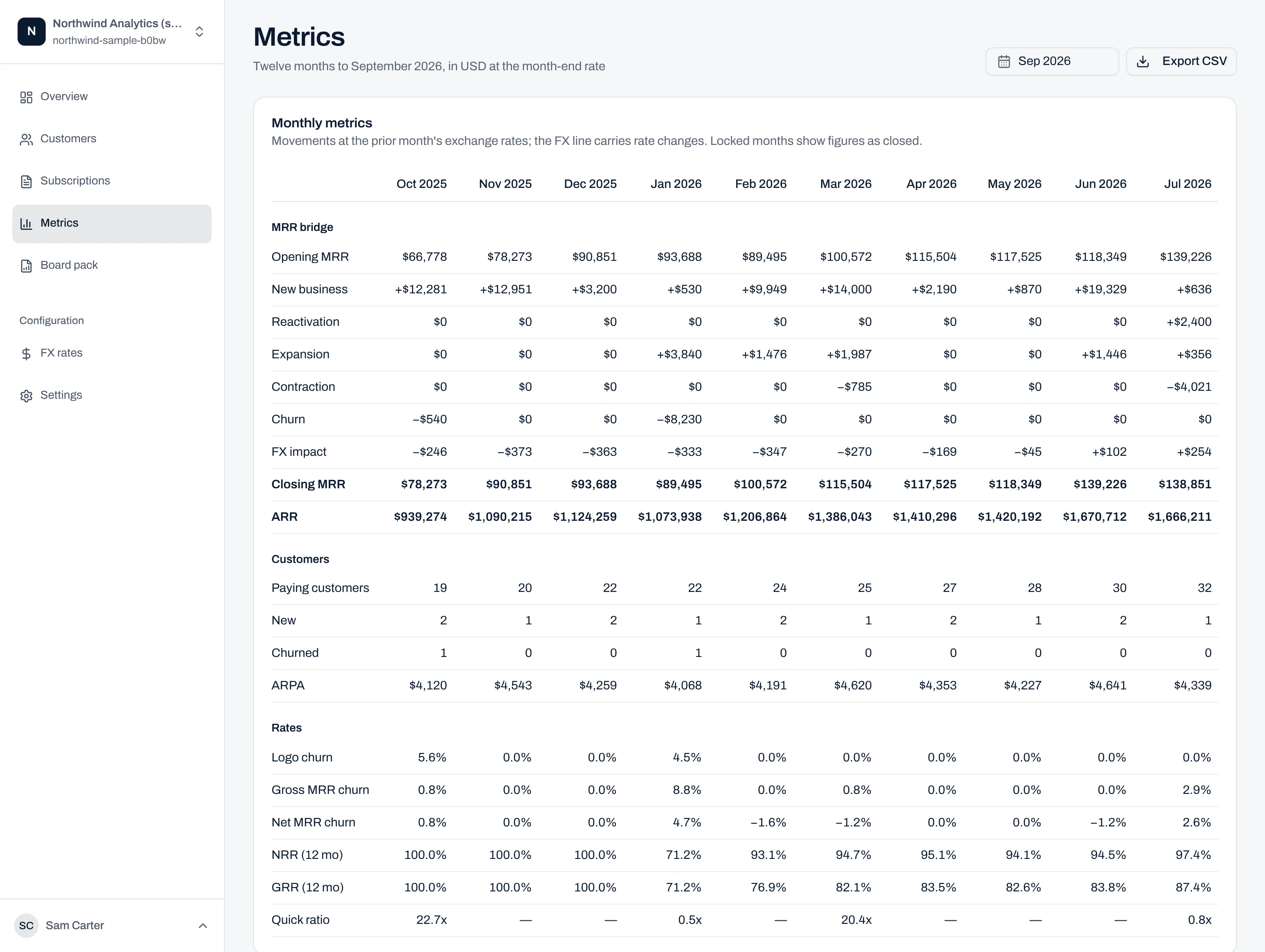
Twelve months of movements on one schedule
One schedule runs from opening MRR through every movement and FX to closing MRR and ARR, then shows customer counts, ARPA, churn, NRR, GRR and the quick ratio. It exports to CSV.
- Retention
- NRR and GRR on a trailing twelve-month basis, at constant currency.
- Churn
- Logo churn, gross MRR churn and net MRR churn, every month.
- Revenue mix
- MRR by plan, segment, industry, legal entity, currency and channel.
- Movers
- The largest gains and losses by customer, with the movement type.
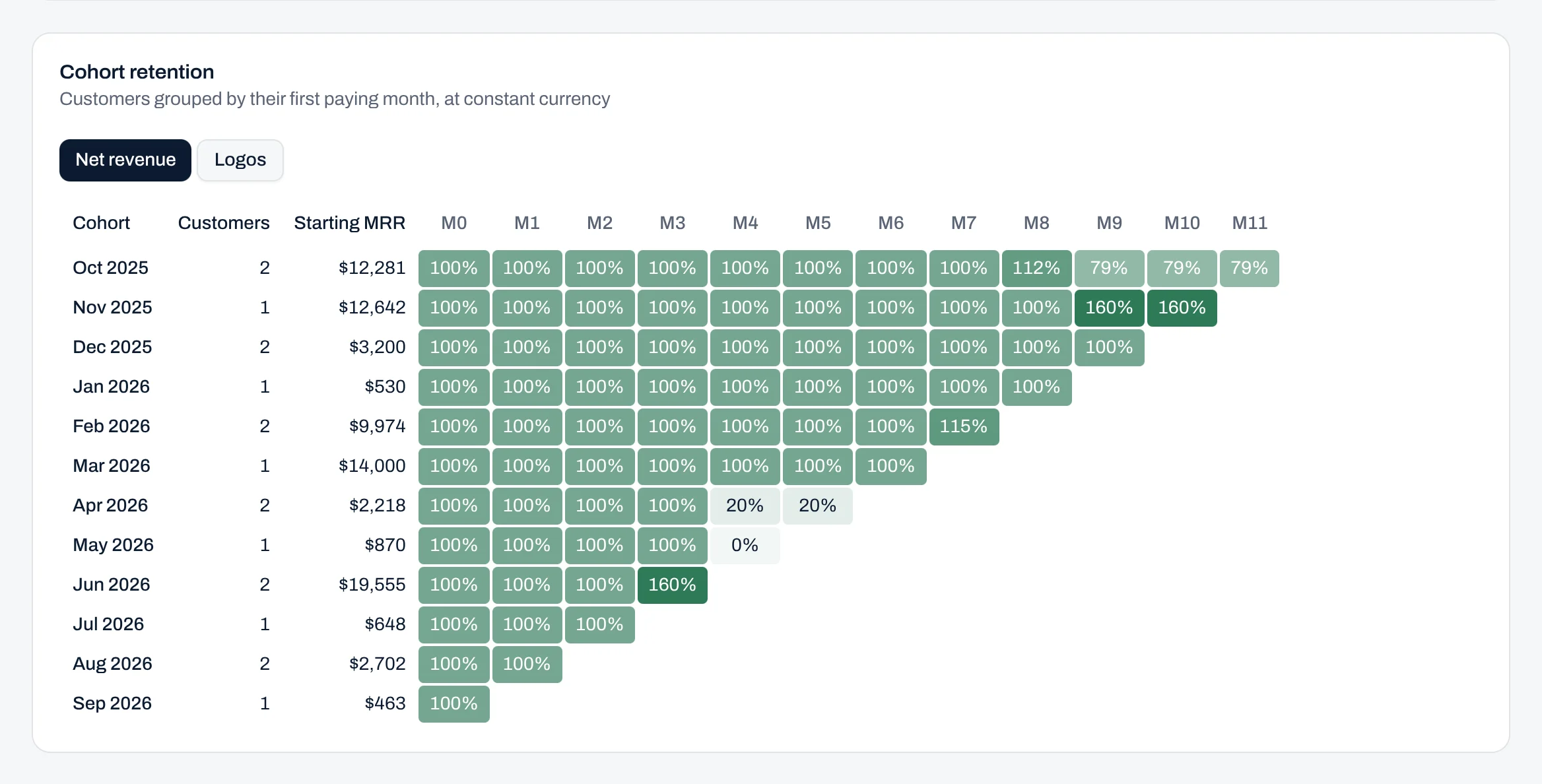
Retention by cohort, in revenue and logos
Each cohort, grouped by its first month with MRR, shows net revenue and logo retention at one set of rates.
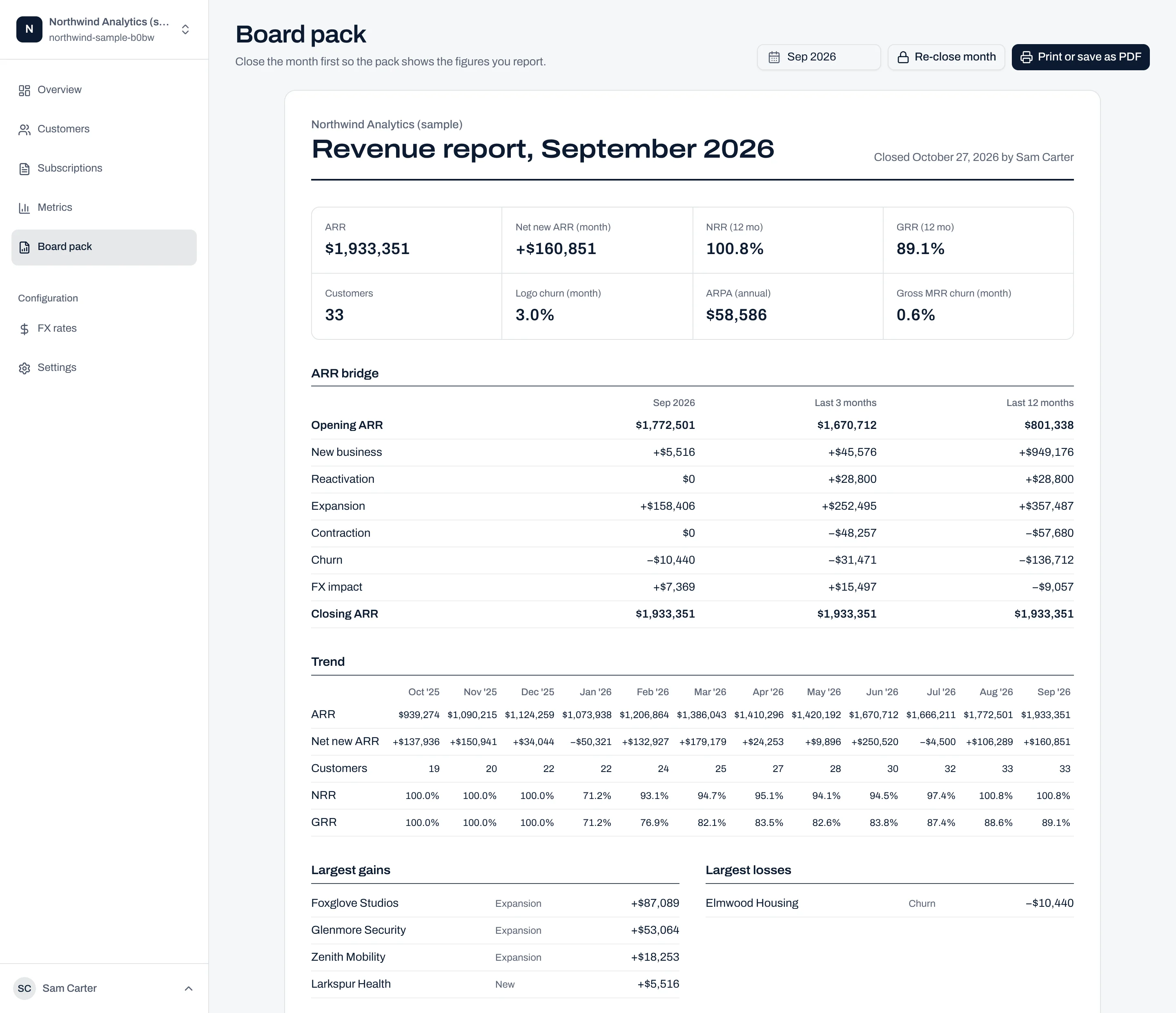
The board pack, generated from the closed month
The pack is built from the closed month. It covers ARR bridges over one, three and twelve months, the trend, the largest movements, renewals due in the next 90 days and ARR by entity and currency, with notes on definitions, rates and restatements. It prints to PDF.
A closed month stays closed
Close the month and its figures are stored as reported. Backdate a contract into it later and you see the reported and live figures side by side, with the difference as a restatement line.
- Data warnings
- Missing or stale rates, overdue renewals and trials past their end date, listed before close.
- Restatements
- Shown beside the reported figure, never absorbed into history.
- Re-close
- A revision is accepted by closing the month again.
Northwind Analytics, sample company
Month close register
| Month | MRR | Status |
|---|---|---|
| Jun 2026 | 139,226 | Closed |
| Jul 2026 | 138,851 | Closed |
| Aug 2026 | 147,708 | Changed after close |
| Sep 2026 | 161,113 | Closed |
| Oct 2026 | 163,950 | Open |
Aug 2026 closed at 147,708. After September closed, a cancellation was found to have taken effect in August rather than July, which puts August at 149,908. The board pack keeps the reported figure and shows the 2,200 difference as a restatement.
Controls a finance function expects
Reported figures are only useful if they hold. Revnewed treats metrics the way the ledger is treated: closed periods, explicit revisions and a record of who changed what.
- Closed periods
- Figures are stored at close and every screen shows a closed month as reported.
- Restatements
- Revisions to closed months appear beside the original, and multi-month bridges carry them on their own line.
- Audit trail
- Every customer, contract and line item records who created and last changed it. Contract changes are written to an event log.
- Roles
- Owner, admin, member and viewer. Only owners and admins close months; viewers have read-only access.
- Workspace isolation
- Each workspace is isolated with Postgres row-level security, enforced on every query.
- Hosting and export
- Stored in Frankfurt, in the EU, and encrypted in transit and at rest. All data exports to CSV.
From workbook to a closed month
There is no implementation project and no integration to maintain. Everything exports to CSV in the import format, so the workbook remains an exit.
Import contracts
Two CSV files, customers and contract line items, from a CRM, a billing system or the existing workbook. Rows that fail validation are listed with the reason.
Review the month
Read the bridge, retention and largest movements. Clear the data warnings: missing rates, overdue renewals and trials past their end date. The fixes are to data, not formulas.
Close and report
Close the month and issue the board pack. The next month opens from the reported figure, and any restatement is shown.
Be first to close a month on Revnewed
Revnewed is in development. Join the waitlist and we will set you up as soon as there is a place, with your contract history imported for you.
First 20 teams get founding pricing.